| |||||||||||||||||||||||||||||||||||||||||||||||||||||||||||||||||||||||||||||||||||||||||||||||||||||||||||||||||||||||||||||||||||||||||||||||||||||||||||||||||||||||||||||||||||||||||||||||||||||||||||||||||||||||||||||||||||||||||||||||||||||||||||||||||||||||||||||||||||||||||||||||||||||||||||||||||||||||||||||||||||||||||||||||||||||||||||||||||||||||||||||||||||||||||||||||||||||||||||||||||||||||||||||||||||||||||||||||||||||||||||||||||||||||||||||||||||||||||||||||||||||||||||||||||||||||||||||||||||||||||||||||||||||||||||||||||||||||||||||||||||||||||||||||||||||||||||||||||||||||||||||||||||||||||||||||||||||||||||||||||||||||||||||||||||||||||||||||||||||||||||||||||||||||||||||||||||||||||||||||||||||||||||||||||||||||||||||||||||||||||||||||||||||||||||||||||||||||||||||||||||||||||||||||||||||||||||||||||||||||||||||||||||||||||||||||||||||||||||||||||||||||||||||||||||||||||||||||||||||||||||||||||||||||||||||||||||||||||||||||||||||||||||||||||||||||||||||||||||||||
| |||||||||||||||||||||||||||||||||||||||||||||||||||||||||||||||||||||||||||||||||||||||||||||||||||||||||||||||||||||||||||||||||||||||||||||||||||||||||||||||||||||||||||||||||||||||||||||||||||||||||||||||||||||||||||||||||||||||||||||||||||||||||||||||||||||||||||||||||||||||||||||||||||||||||||||||||||||||||||||||||||||||||||||||||||||||||||||||||||||||||||||||||||||||||||||||||||||||||||||||||||||||||||||||||||||||||||||||||||||||||||||||||||||||||||||||||||||||||||||||||||||||||||||||||||||||||||||||||||||||||||||||||||||||||||||||||||||||||||||||||||||||||||||||||||||||||||||||||||||||||||||||||||||||||||||||||||||||||||||||||||||||||||||||||||||||||||||||||||||||||||||||||||||||||||||||||||||||||||||||||||||||||||||||||||||||||||||||||||||||||||||||||||||||||||||||||||||||||||||||||||||||||||||||||||||||||||||||||||||||||||||||||||||||||||||||||||||||||||||||||||||||||||||||||||||||||||||||||||||||||||||||||||||||||||||||||||||||||||||||||||||||||||||||||||||||||||||||||||||||
Friday, 4 December 2015
KENWOOD Car Radio Stereo Audio data

KENWOOD Car Radio Stereo Audio Wiring Diagram
KENWOOD KDC-7070R, KDC-5040R, KRC-958R
| |||||||||||||||||||||||||||
KENWOOD KRC-155D
| |||||||||||||||||||||||||||
KENWOOD KDC-84R, KDC-94R
| |||||||||||||||||||||||||||
KENWOOD KRC-951RDS, KRC-851D, KRC-751D/L, KRC-651D/L, KRC-451D/L
| |||||||||||||||||||||||||||
KENWOOD KRC-951R, KRC-852D/L, KRC-752R, KRC-453D/L, KRC-452D/L
| |||||||||||||||||||||||||||
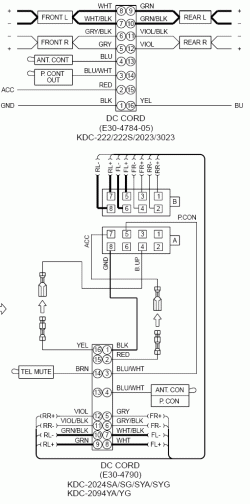
KENWOOD KDC-222, KDC-2023, KDC-3023, KDC-2024, KDC-2094
 | |||||||||||||||||||||||||||
KENWOOD KRC-X727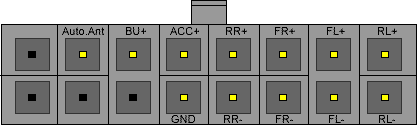 | |||||||||||||||||||||||||||
KENWOOD KRC-654RD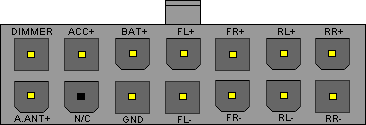 | |||||||||||||||||||||||||||
KENWOOD KRC-28YA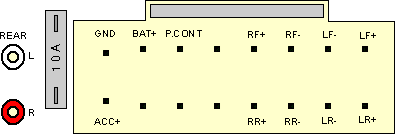 | |||||||||||||||||||||||||||
KENWOOD KRC-265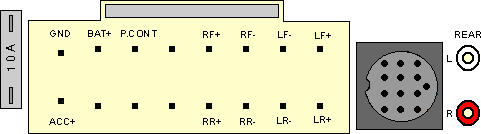 | |||||||||||||||||||||||||||
KENWOOD KRC-3631 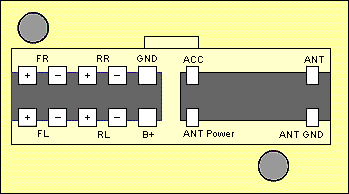 |




Friday, 24 October 2014


Wednesday, 27 August 2014
Sony Service Menu
Sony Service Menu
Contents
1 Sony Service Menu Method 1
2 Sony Service Menu Method 2
3 Sony Service Menu Method 3
4 Sony Service Menu Method 4
5 Sony Service Menu Navigation Tips
Sony Service Menu Method 1
Put the TV in standby mode then press the following buttons on the remote: {DISPLAY} {5} {VOL+} {POWER}
Sony Service Menu Method 2
Put the TV in standby mode then press the following buttons on the remote: {DISPLAY} {5} {POWER}
Sony Service Menu Method 3
Put the TV in standby mode then press the following buttons on the remote: {DISPLAY} {5} {PICTURE} {POWER}
Sony Service Menu Method 4
Put the TV in standby mode then press the following buttons on the remote: {DISPLAY} {5} {VOL+} {PICTURE} {POWER}
Exit Service Menu = <Power>
Menu Next = <1>
Menu Previous = <4>
Category Next = <2>
Category Previous = <5>
Adjust Up = <3>
Adjust Down = <6>
Save New Settings = <MUTE> <ENTER>
Restore Factory Defaults = <8> <ENTER>
Sharp Service Menu
Sharp Service Menu
Contents
1 LCD Sets
2 Other Sets (CRT)
3 Alternative Method
4 Sharp Projector Service Menu Access Method 1
5 Sharp Projector Service Menu Access Method
LCD Sets
- While the LCD is on, unplug the power cable.
- Then while pressing the {INPUT} & {VOL -} buttons on the remote, plug the power cable back into the outlet.
- When it powers up you will see a little "k" appear in brackets.
- Then on the TV, press and hold {VOL -} & {CH -} down and release.
- The Service Menu will be displayed.
Use {CH+} {CH -} buttons to navigate, Use {VOL+} {VOL -} buttons to adjust the value.
Other Sets (CRT)
- Unplug the TV
- Press and hold the {VOL -} & {CH+} buttons.
- While holding the above buttons, plug in the TV.
- The TV will turn on with the Service Menu displayed.
Use {CH+} {CH -} buttons to navigate, Use {VOL+} {VOL -} buttons to adjust the value.
Alternative Method
- Press the {MENU} button.
- Then press the {4} {7} {2} {5} buttons.
- The Service Menu will be displayed.
- Use the {UP} {DOWN} buttons to select items.
- Use the {LEFT} {RIGHT} buttons to change settings.
- To exit, turn the power off.
Sharp Projector Service Menu Access Method 1
- Press {UP}, {UP}, {DOWN}, {DOWN}, {RIGHT}, {LEFT} & {ENTER} buttons on the remote control.
Sharp Projector Service Menu Access Method 2
- Press {INPUT}, {UP}, {DOWN}, {ENTER}, {ENTER} & {MENU} buttons on the back of the Projector.
- To exit the Service Menu: Press {INPUT}, {UP}, {DOWN}, {ENTER}, {ENTER} & {MENU} buttons again on the back of the Projector.
Sanyo Service Menu
Sanyo Service Menu
Contents
1 Sanyo TV Service Menu Method 1
2 Sanyo TV Service Menu Method 2
3 Sanyo Projector Service Menu Method 1
3.1 Factory Menu Access
3.2 Service Menu Access
4 Sanyo Projector Service Menu Method Sanyo TV Service Menu Method 1
- Unplug the power cable.
- Press and hold the {MUTE} button on the remote control while plugging the power cable back into the outlet.
- Keep pressing the {MUTE} button until the TV powers on with the Service Menu displayed.
- Use the {CH+} {CH-} buttons to select menus.
- Use the {VOL+} {VOL -} buttons to change settings.
- Some menus might have sub-addresses. Use the numeric buttons {0} to {7} to adjust sub-item data.
- Press the {MENU} button or turn the TV off to exit.
Sanyo TV Service Menu Method 2
- Unplug the power cable.
- Press and hold the {VOL -} button on the TV while plugging the power cable back into the outlet.
- Keep pressing the {VOL -} button until the TV powers on with the Service Menu displayed.
- Use the {CH+} {CH-} buttons to select menus.
- Use the {VOL+} {VOL -} buttons to change settings.
- Some menus might have sub-addresses. Use the numeric buttons {0} to {7} to adjust sub-item data.
- Press the {MENU} button or turn the TV off to exit.
Sanyo Projector Service Menu Method 1
Factory Menu Access
- Press and hold the {SELECT} and {INPUT} buttons on the Projector at the same time for about 10 seconds.
- The Factory Menu will be displayed.
Service Menu Access
- Press and hold the {MENU} and {INPUT} buttons on the Projector at the same time for about 10 seconds.
- The Service Menu will be displayed.
- Use the {UP} {DOWN} {LEFT} {RIGHT} buttons to move through menus and change values.
- To exit, turn the Projector Off.
Sanyo Projector Service Menu Method 2
- Press & hold the {MENU} button on the Projector for about 10 seconds.
- The Service Menu will be displayed.
- Use the {UP} {DOWN} {LEFT} {RIGHT} buttons to move through menus and change values.
- To exit, turn the Projector Off.
Samsung Service Menu
Samsung Service Menu
Contents
1 How To Get into The Samsung Service Menu
1.1 Method 1
1.2 Method 2
1.3 Method 3
1.4 Method 4
1.5 Method 5
1.6 Method 6
2 Samsung LCD Monitor Service Menu Instructions
How To Get into The Samsung Service Menu
You can use the Samsung service menu, for such things as resetting the digital tuner, a total factory reset and enabling/disabling hotel mode. In this mode you must be careful as you can cause irreparable damage to your set.
Method 1
Put TV on standby and then push in series these buttons on the remote: 'info, menu, mute, power' the TV will then turn itself on and display a menu.
Method 2
Turn the power off. On the remote, press Mute followed by 1, 8, 2, Power in sequence.
Method 3
With the TV in standby, press the {DISPLAY} {P.STD} {MUTE} {POWER} on the remote.
Method 4
With the TV in standby, press the {SLEEP} {P.STD} {MUTE} {POWER} on the remote.
Method 5
With the TV in standby, press the {DISPLAY} {MENU} {MUTE} {POWER} on the remote.
Method 6
With the TV in standby. On the remote, press Mute followed by 1, 1, 9, Enter in sequence.
Samsung LCD Monitor Service Menu Instructions
- Power on the lcd monitor and open the OSD menu.
- Set the Brightness and Contrast to 0.
- Then press and hold the "SOURCE or ENTER" button for 5 second until the "SERVICE FUNCTION MENU" pop-up.
Subscribe to:
Posts (Atom)